

Close Menu
  • Tech Insights
  • Laptops
  • Mobiles
  • Gaming
  • Apps
  • Money
  • Latest in Tech
Facebook X (Twitter) Instagram
TechzLab – Tech News, Gadgets, Mobile & IT UpdatesTechzLab – Tech News, Gadgets, Mobile & IT Updates
  • Tech Insights
  • Laptops
  • Mobiles
  • Gaming
  • Apps
  • Money
  • Latest in Tech
TechzLab – Tech News, Gadgets, Mobile & IT UpdatesTechzLab – Tech News, Gadgets, Mobile & IT Updates
Home » These Google Pixel phones can now tell you if your phone is overheating by measuring the exact temperature: How it works
Mobiles

These Google Pixel phones can now tell you if your phone is overheating by measuring the exact temperature: How it works

adminBy adminDecember 5, 2024No Comments2 Mins Read
Facebook Twitter Pinterest LinkedIn Tumblr Email
Share
Facebook Twitter LinkedIn Pinterest Email

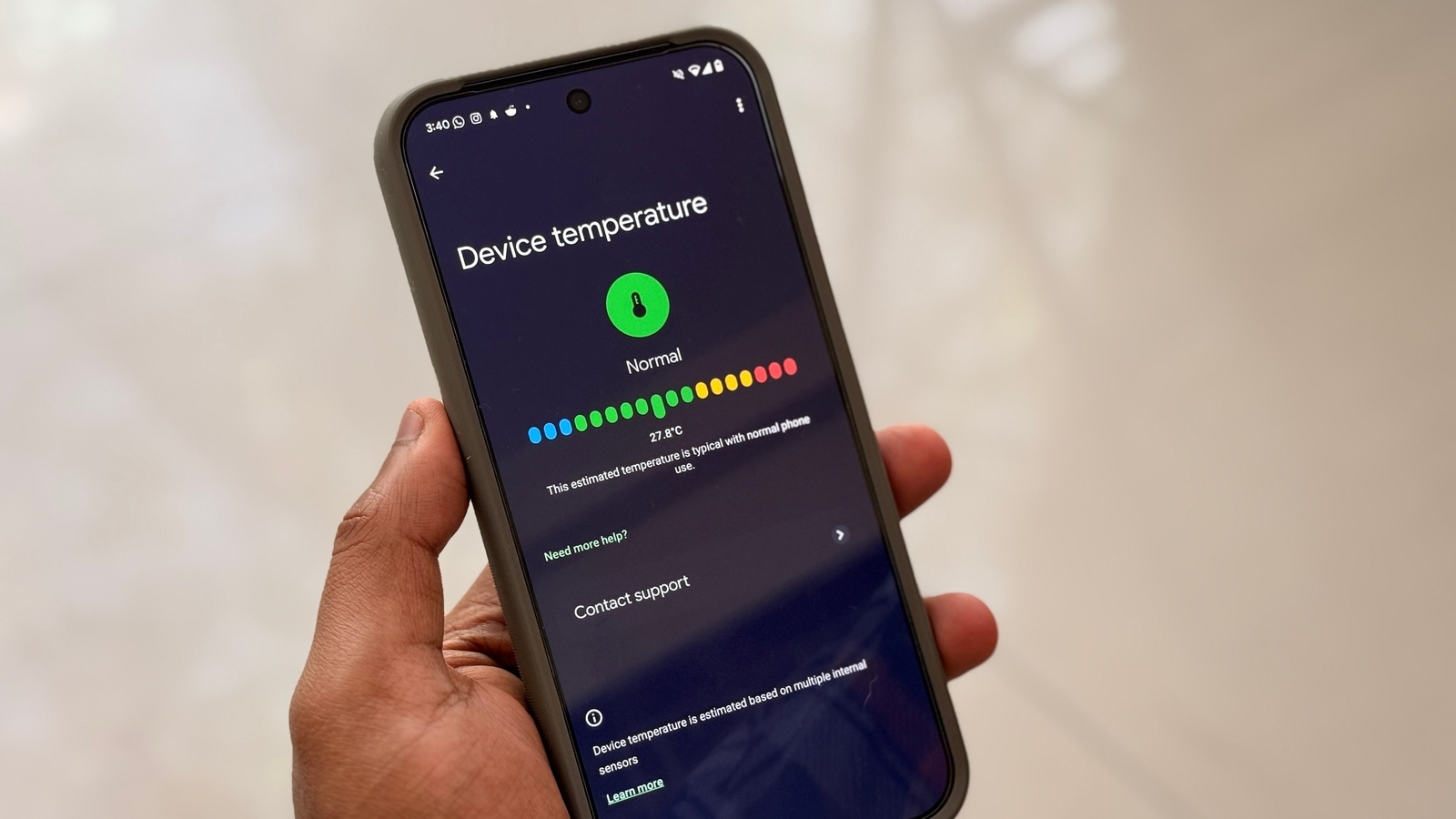
How often have you noticed your device feeling warm to the touch but had no way to gauge just how hot it really was? Without a thermometer, checking the surface temperature of your phone is impossible. However, if you own a Google Pixel 6 or a newer model, including the Pixel 9 series, your phone now can accurately measure its temperature. This feature proves especially useful for diagnosing potential issues with your device. This feature has just rolled out, introduced with an update to the Pixel Troubleshooting app. 

Also Read: iPhone 17 Pro tipped for a major display upgrade- Here’s what we know so far

How to check your Google Pixel devices’s temperature?

  1. Open the Settings app on your Pixel device.
  2. Navigate to Battery and then to Battery Diagnostics.
  3. In the Battery Diagnostics section, you’ll find an option that says Your Phone is Very Warm. Tap on it.
  4. Once selected, the device’s temperature will be displayed. The reading is colour-coded:
    • Blue: Cool
    • Green: Normal
    • Yellow: Warm
    • Red: Elevated

Depending on your region, language preferences, and measurement units, the temperature will be displayed in either Fahrenheit or Celsius.

Not sure which
mobile to buy?

Also Read: Apple Watch Series 10 for free: Complete this task to get a full refund – How this deal works

If you haven’t received the update yet..

Do note that this new feature is currently rolling out via the Google Play Store. The live temperature feature is available in version 1.0.693922709 of the Pixel Troubleshooting app. We independently verified this on our Pixel 9 Pro XL device, and it works as expected. Based on reports, the feature is also supported on the Pixel 6, Pixel 7, Pixel 8, and other devices in the Pixel 9 series. However, a report from 9to5Google confirms that this feature isn’t available on the Pixel Tablet yet.

This functionality is expected to be particularly handy, especially when performing resource-intensive tasks on the go and wanting to ensure your phone doesn’t overheat.

Also Read: Squid Game coming to Call of Duty in 2025: New crossover, release date, and what to expect

Share. Facebook Twitter Pinterest LinkedIn Tumblr Email
admin
  • Website

Related Posts

Google surprises Pixel 8 owners with a major camera upgrade

December 27, 2025

2025 Winners and Losers: Xiaomi

December 26, 2025

I’ve tried the best phone cameras in 2025 – here’s what the Samsung Galaxy S26 Ultra needs to bring to the table in 2026

December 25, 2025

Comments are closed.

Latest
  • FaZe Clan’s future is uncertain after influencers depart | TechCrunch December 27, 2025
  • The Best Deals Today: Ninja Gaiden 4, Mega Man Animated Series, Assassin’s Creed Shadows, and More December 27, 2025
  • Google surprises Pixel 8 owners with a major camera upgrade December 27, 2025
  • Tablets vs. Textbooks | Pros, Cons, Debate, Arguments, & Education – Britannica December 27, 2025
  • In Cryptoland, Memecoin Fever Gives Way to a Stablecoin Boom December 27, 2025
We are social
  • Facebook
  • Twitter
  • Pinterest
  • Instagram
  • YouTube
  • Vimeo

Subscribe to Updates

Get the latest creative news from Techzlab.

Tags
AI AI bubble ai coding Amazon Anthropic Apple Apps artificial intelligence ChatGPT cybersecurity data centers Donald Trump electric vehicles Elon Musk evergreens EVs Exclusive gemini Google Grok In Brief iPhone Meta Microsoft Netflix nvidia Openai Perplexity Pinterest robotics Scales to slate auto Softbank Solar Power SpaceX Spotify streaming TechCrunch All Stage TechCrunch Disrupt TechCrunch Disrupt 2025 Tesla Tiktok Trump Administration Uber YouTube
Archives
Quick Link
  • Apps (361)
  • From the Editor (4)
  • Gaming (394)
  • Laptops (395)
  • Latest in Tech (391)
  • Mobiles (398)
  • Money (225)
  • Tech Insights (377)
Don't miss

Could You Use a Rowboat to Walk on the Seafloor Like Jack Sparrow?

December 26, 2025

Intel is winning the budget CPU fight right now and AMD is starting to feel it

December 25, 2025

India rolls back order to preinstall cybersecurity app on smartphones

December 24, 2025
Follow us
  • Facebook
  • Twitter
  • Pinterest
  • Instagram
  • YouTube
  • Vimeo
© 2025 Techzlab.com Designed and Developed by WebExpert.
  • Home
  • From the Editor
  • Money
  • Privacy Policy
  • Contact

Type above and press Enter to search. Press Esc to cancel.